Transcripts · Channels · Comparison
Download Every Transcript from a YouTube Channel: 5 Ways Compared
YTAPI, GetTranscript, Transcribr, yt-dlp and Apify for downloading a whole channel's transcripts: how many videos each takes at once, prices, formats, and our own timed export of a 554-video channel.
· Updated · 8 min read · YTAPI
Copying one transcript from YouTube is easy. Getting every transcript from a channel, say 400 lectures or five years of a podcast, is a different job. You need the list of videos, a fetch for each one that doesn't get rate-limited halfway, and files you can still make sense of afterwards.
This post compares five ways to do it: our own channel export, two web tools sold in credit packs, yt-dlp and Apify's scrapers.
We make YTAPI, so read this with that in mind. For YTAPI, the numbers below come from our own tests on October 25, 2026, and we describe how we ran them. We didn't buy credits for the other tools or time them. What we say about them comes from their own pages as we read them on October 25, 2026, linked so you can check. Where a page doesn't say something, the table says "not stated" rather than guessing.
At a glance
| Videos in one go | Price (smallest pack or rate) | Formats | Runs where | |
|---|---|---|---|---|
| YTAPI | Newest 5,000 of a channel or playlist | $9 for 2,000 credits; 200 free | Markdown, TXT, SRT, JSON, plus index.csv | Our servers; you get an email |
| GetTranscript | 100 per batch | $3.99 for 400 credits | TXT, JSON, CSV, SRT, VTT | Their servers |
| Transcribr | Not stated | $4.99 for 100 credits; 25 free | TXT, JSON, CSV, SRT, VTT, Markdown | Not stated |
| yt-dlp | Any channel or playlist | Free, open source | VTT, SRT and others | Your computer and IP |
| Apify actors | Depends on the actor; the most used takes one video per run | $10 per 1,000 for the most used actor | JSON, CSV, Excel | Apify |
All five read the captions YouTube already has, whether the creator uploaded them or YouTube generated them. None of them makes a transcript for a video without captions.
YTAPI channel export
Good for: putting a channel into NotebookLM, Claude Projects or a RAG index, and anyone who wants the files plus a spreadsheet of what's in them.
In the dashboard, under Exports, you paste a channel or playlist URL or a handle. You choose how many of the newest videos to include (up to 5,000), pick a format, and optionally a caption language. The estimate is free and shows the most it can cost before you start.
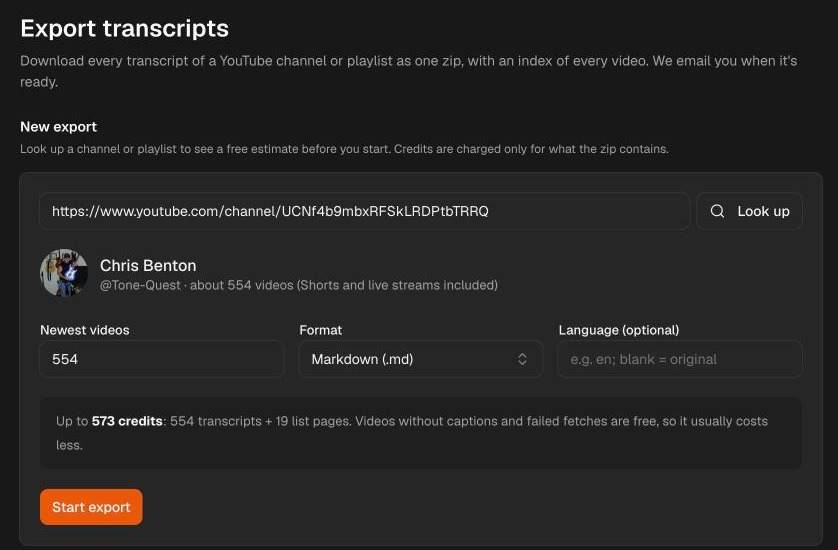
The job runs on our servers, so you can close the tab. When it's done, we email a download link that works for 7 days. The Chrome extension starts the same export from a channel or playlist page, or from videos you pick there.
The zip holds one file per video, named like 0001 Video title [videoid].md with the newest first (organized into videos/, shorts/ and live/ subfolders for whole-channel exports), plus combined files per type, a README.txt, and an index.csv with these columns:
position,video_id,title,url,type,published,duration_seconds,language,status,filestatusis one of:ok;no_captions;failed;skipped, when the balance ran out.
publishedis the age YouTube showed when the export ran ("3 weeks ago"), not an exact date.- Markdown format puts a
[m:ss]timestamp heading before each paragraph, about every 30 seconds, so a model can cite where in the video something was said.
How fast it was
On October 25, 2026, we exported the whole Chris Benton channel (guitar pedal demos and reviews, about 8,000 subscribers). Only one of its videos had been fetched by YTAPI before, so the rest came straight from YouTube.
| Chris Benton export | Result |
|---|---|
| Videos | 554 |
| Transcripts in the zip | 278 |
| Without captions (free) | 276 |
| Failed | 0 |
| Credits used | 297: 278 transcripts and 19 list pages |
| Start to ready | 46 seconds |

Half the channel had no captions because many of the videos are pedal demos with no speech. We opened a sample of them on YouTube, and none had a transcript there either.
The same day we also tested the transcript API that the export runs on. We sent 7,000 requests for videos YTAPI had never fetched before, at up to 200 concurrent requests.
- Errors: none. Every request returned a transcript or a definite "no captions" or "not available in this region".
- Up to 100 concurrent requests: the median response stayed at 414–426 ms, and the p99 was 1.2–1.8 s depending on the level.
- At 200 concurrent requests: the median rose to 648 ms and the p99 to 3.0 s, still with no errors.
The test tool, the video list, every request record and the channel export's index.csv are on GitHub, so you can check the numbers.
Cost. 1 credit per transcript, plus 1 per page of the video list: 100 videos per page for a channel or playlist (48 per page for Shorts). A 500-video channel is 500 + 5 = 505 credits if every video has captions, about $2.27 from the $9 pack. Videos without captions, failures and skipped videos are free, and credits don't expire.
Limits.
- Only the newest N videos. There's no date range, and no "oldest first".
- Channel exports cover all uploads by default (videos, Shorts and live replays). You can narrow an export to just regular videos, Shorts or live streams by pasting the matching tab link (such as
/videos,/shortsor/streams). - The result comes by email and as a download, not in the browser while you wait.
- From code, the same thing takes two calls: list the channel, then fetch transcripts in batches.
GetTranscript
Good for: a one-off zip of plain text or subtitle files, with the cheapest pack to start.
GetTranscript sells credits once, with no subscription:
- $3.99 for 400;
- $7.99 for 1,000;
- $19.99 for 3,000.
That is $0.0067 to $0.01 a video. One credit is one video, and credits stay in your account. The page says videos that fail or have no captions are not charged. A single video is free without signing up.
Limits: batches of up to 100 videos, so a large channel takes several runs. The page doesn't mention Markdown, an index file, or a way to pick videos by date, and its only speed claim is "seconds".
Transcribr
Good for: people who want a web app, a Chrome extension and an API on one credit balance.
Transcribr sells packs that don't expire:
- $4.99 for 100;
- $14.99 for 500;
- $39.99 for 2,000;
- $79.99 for 5,000.
That is $0.05 down to $0.016 a transcript, with 25 free. It exports TXT, JSON, CSV, SRT and VTT, and its format pages add Markdown and exports aimed at ChatGPT, Claude and NotebookLM.
Limits:
- It's the most expensive per transcript of the paid tools here.
- The page doesn't say how many videos one export can take, how a channel export is charged, or how long it takes beyond "in seconds".
yt-dlp
Good for: developers who want full control and don't mind running it themselves.
yt-dlp is free and takes any channel or playlist URL. To get captions without the videos:
yt-dlp --skip-download --write-subs --write-auto-subs \
  --sub-langs "en" --sleep-subtitles 60 \
  "https://www.youtube.com/@NASA/videos"
It also filters by upload date (--dateafter) and position (--playlist-end), which the web tools don't advertise.
Limits:
- Blocks. YouTube rate-limits subtitle downloads, and a long run from one IP usually ends in HTTP 429 or a "Sign in to confirm you're not a bot" error.
- Time. Pausing between files helps, but makes a large channel take hours. Past that you need proxies, which cost money too.
- Output. You get one
.vttfile per video and write your own code to clean and index them.
Apify actors
Good for: teams already on Apify who want transcripts as rows in a dataset, next to other scraped data.
Apify is a marketplace, so "Apify" means whichever actor you pick:
- The most used transcript actor we found, Pinto Studio's (about 26,700 users), charges $10 per 1,000 results and processes one video per run.
- Smaller actors charge less per result, but most take video URLs, not a channel.
- One actor's page says YouTube answers HTTP 429 after about twenty fetches from one IP, and its author reports a 75–88% success rate on Apify's datacenter proxies.
Limits: you assemble the pipeline yourself: list the channel, feed the video URLs to a transcript actor, then export the dataset. Some actors also charge for Apify platform usage on top of the per-result price. Results are dataset rows (JSON, CSV, Excel), not a folder of files.
Which one to use
- For an AI knowledge base or research, or any channel over a few hundred videos: YTAPI. You get the timestamped Markdown, the index, and up to 5,000 videos in one export, and you don't pay for videos without captions.
- If you'd rather write code than pay: yt-dlp is free. Plan for rate limits, hours of pauses on a large channel, or proxies.
- If your pipeline already runs on Apify: a transcript actor plugs into it, but you still build the channel listing, paging and cleanup yourself.
- For a single video: YTAPI's free transcript tool needs no account.
FAQ
What happens to videos without captions?
There's nothing to download. YTAPI marks them no_captions in index.csv and doesn't charge. GetTranscript says it doesn't charge for them either; the other tools' pages don't say. To transcribe a video with no captions, you need speech-to-text on the audio, which none of these do.
How long does a large channel take?
The 554-video channel above took 46 seconds from starting the export to the zip being ready. A larger channel takes longer, since every video is a separate fetch. It runs in the background, and the email tells you when the zip is ready. The other tools here don't publish timings, and we didn't time them.
What about Chrome extensions?
Some extensions download a playlist's or channel's transcripts right from YouTube's pages. When they fetch in your browser, a long run uses your IP and keeps your tab busy until it's done. YTAPI's extension shows single transcripts in the browser and sends bulk downloads to the export above, which runs on our servers.
Can I export Shorts or live streams?
Yes. Channel exports include all uploads (regular videos, Shorts, and live replays) by default. If you only want one kind, paste the channel's /shorts, /videos, or /streams link into the export form.
Updated October 28, 2026. Published October 25, 2026. Prices and features of other tools are from their pages as of that date and change often. Tell us at [email protected] if something here is out of date.