Claude · MCP · AI Agents
How to Get YouTube Transcripts in Claude: Connector, Plugin and Skills
Claude can't hear what's said in a YouTube video on its own. Connect YTAPI on claude.ai or install the plugin in Claude Code, sign in, and Claude can summarize, quote and compare videos. No API key to copy.
· 7 min read · YTAPI
Paste a YouTube link into Claude and ask what the video says, and the answer is usually built from the title and description. Claude's web tools see the page, not what's spoken in the video. The captions are what it needs, and with a connector Claude can fetch them itself.
We make YTAPI, a transcript API, so this guide uses it. We set it up on claude.ai and in Claude Code on October 7 and 8, 2026; the steps, screens and numbers below are from those runs.
Which setup you need
| You use | Set up | API key? |
|---|---|---|
| Claude on the web or Claude Desktop | The connector | No, you sign in |
| Claude Code | The plugin (or the connector, see below) | No, you sign in |
| Cursor, Codex, VS Code, other agents | Skills or MCP with a key (setup) | Yes |
All three give Claude the same five tools: get a transcript, get video details, search YouTube, list a channel's videos, list a playlist's videos.
In Claude: add the connector
Free plans can add one custom connector; paid plans can add more (Anthropic's guide).
- Open Customize → Connectors (also reachable from Settings → Connectors), click + Add, then Add custom connector.
- Name it
YTAPIand enter the server URL:
https://api.ytapi.dev/mcp- Click Connect. A YTAPI page opens. Sign in with your email, Google or GitHub, or create an account: new accounts get 200 free credits and no card is needed.
- Check the consent screen and click Allow. It names the app, your account, what the app can do, and the site you go back to.
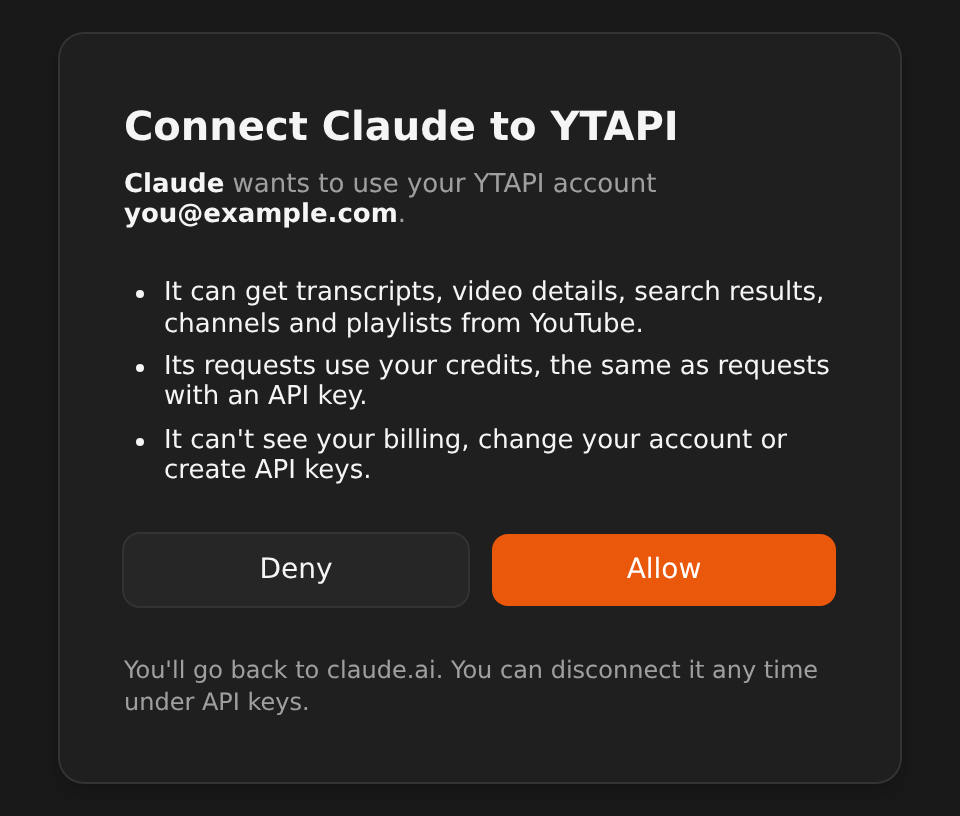
That's it. Start a new chat and ask about a video. The first time Claude calls a YTAPI tool it asks for permission; all five tools only read public YouTube data, so allowing them is low-risk.
We've also submitted YTAPI to Claude's connector directory. Once it's listed, you'll be able to add it from there without typing the URL.
What happens when you sign in
There is no key to copy because the connector uses OAuth, the sign-in flow the MCP specification defines:
- Claude asks ytapi.dev for permission on your behalf, and you approve it on our site, not in Claude.
- Claude gets an access token that lasts an hour and renews itself. We store only a hash of it.
- Claude calls YTAPI from Anthropic's servers, not from your computer (Anthropic's guide explains this).
- On ytapi.dev, under API keys, the connection shows up as "Claude" with a Connected app label. Its requests appear under Usage like any other key's.
- To disconnect, click Revoke there. Claude's tokens stop working within a minute, and connecting again asks for your approval again.
Claude can only use the five YouTube tools. It doesn't get your email address, your billing details or your API keys.
In Claude Code: install the plugin
The plugin adds the YTAPI server plus three skills that tell Claude how to use it well:
/plugin marketplace add ytapi/youtube-skills
/plugin install ytapi@ytapi
Then run /mcp, pick plugin:ytapi:ytapi, and choose Authenticate. Your browser opens the same YTAPI sign-in and consent screen. Back in Claude Code, the tools are ready.
The skills cover three jobs:
- youtube-summarize: key points with links to the moment each is made, quotes, other caption languages.
- youtube-channel-digest: a channel's latest or most popular uploads, or a playlist, summarized one by one.
- youtube-topic-research: search YouTube, read the most relevant videos and compare what they say, with timestamped sources.
If you already added the connector on claude.ai and Claude Code is logged in with the same account, you don't strictly need the plugin: Claude Code picks up claude.ai connectors automatically. With both, it uses the plugin's server and hides the duplicate. You can also add the server by hand with claude mcp add --transport http ytapi https://api.ytapi.dev/mcp and sign in through /mcp.
A real run
In Claude Code, with the connector signed in, we asked:
Summarize https://www.youtube.com/watch?v=aircAruvnKk into key points with timestamped links.Claude called get_transcript once. The video, 3Blue1Brown's "But what is a neural network?", is 18:40 long. Its creator captions came back as 19,001 characters in a single page, for 1 credit. Claude's summary, shortened:
0:04 A sloppy 28×28 "3" is easy for your brain to read and hard to write a program for.
2:52 A "neuron" here just holds a number between 0 and 1. The input layer has 784 of them, one per pixel.
4:14 Two hidden layers of 16 neurons sit between the input and the 10 output neurons, one per digit.
8:55 Each connection has a weight and each neuron a bias. The weighted sum goes through a sigmoid to land between 0 and 1.
12:18 About 13,000 weights and biases in all. "Learning" means finding good values for them, which is the next video's topic.
17:30 In the closing chat, Lisha Li notes that modern networks mostly use ReLU instead of sigmoid because it trains more easily.
Each timestamp links to that moment in the video. The free get_video_info tool lists 31 caption tracks for this video, from Arabic to Urdu. Ask for the summary in any of those, or in your own language, and Claude reads the matching track.
More things to ask
These are the prompts we tested, with the tool each one uses:
| Ask Claude | Tool |
|---|---|
| What caption languages does this video have? Also its title and length. | get_video_info (free) |
| Summarize this video into key points with timestamped links. | get_transcript |
| Search YouTube for recent talks about Rust async and list the top five with their channels and view counts. | search_youtube |
| What has @3blue1brown uploaded lately? List the last five videos. | get_channel_videos |
| List every video in this playlist with its length. | get_playlist_videos |
Combining them works too: "read the three most-viewed talks on X and tell me where they disagree" uses search, then a transcript per video.
What it costs
| Request | Credits |
|---|---|
| Video details and caption languages | Free |
| Transcript | 1 for the first page; later pages of the same transcript are free for 30 minutes |
| Search, channel or playlist page | 1 per page |
| Anything that fails, such as a video without captions | Free |
New accounts get 200 free credits. Until you buy a pack, an account makes 1 request per second (bursts of 20) and 100 a day. Packs start at $9 for 2,000 credits and never expire.
What it can't do
- It only reads captions. Claude gets the words, not the picture. Slides, code on screen and charts are only there if the speaker says them.
- No captions, no transcript. Some uploaders turn captions off, and auto-generated captions can take a while to appear on a new video. Those requests return an error and cost nothing.
- Public videos only. Private and members-only videos aren't available.
- Auto-generated captions mishear things, especially names and jargon. The summarize skill tells Claude to flag a term that looks misheard rather than guess.
New uploads and small channels do work: a transcript nobody has asked for before is fetched when you ask, usually in under a second. We measured that here.
Using another agent?
Cursor, Codex, VS Code, OpenClaw and others connect to the same server with an API key in a header; the setup page has the config for each. For agents that read Agent Skills, install the skills, which call the REST API with your key:
npx skills add ytapi/youtube-skillsFAQ
Does this work on the free Claude plan?
Yes. Free plans can add one custom connector, and YTAPI's free credits cover about 200 transcripts.
Why can't Claude read YouTube videos by itself?
Claude's web tools fetch a page's HTML, and the words spoken in a YouTube video aren't in it. The captions sit behind YouTube's player, which is what YTAPI fetches.
Does it work with long videos?
Yes. Transcripts come back in pages of 40,000 characters, and Claude asks for the next page when it needs it. Only the first page costs a credit. For multi-hour videos in your own code, see handling long transcripts at scale.
Can Claude see my account or other data on ytapi.dev?
No. The connection only allows the five YouTube tools. Claude never receives your email address, billing details or API keys.
How do I disconnect Claude?
On ytapi.dev, open API keys, find "Claude" with the Connected app label and click Revoke. You can also remove the connector in Claude's settings.
Create a free account and connect Claude in a couple of minutes.